WordPress refuse to let me to upload script files, so, you must copy paste code from below and save it like sh file for example in your user folder: pictures-gui.sh
Make this file executable: sudo chmod +x pictures-gui.sh
Add alias in terminal conf file to execute command with one word, copy paste this line in your .zshrc or .bashrc file: alias picgui=’/home/kali/pictures-gui.sh’
Refresh bashrc or zshrc: source /home/kali/.zshrc
Now you can just open terminal and type picgui and script will be executed and finish its job. Change kali to your username and you can choose different alias as you wish. There is NO path for smiley and other things because this is GUI, graphical choosing with pop up window, as you see number 1 is to choose folder where are pictures you want to process. Because script makes backup, you will not loose pictures if you made mistakes or want to try this or that. Just unpack zip folder and try again what you want. Make sure zenity is installed: sudo apt install zenity imagemagick exiftool zip (plus: python3 -m pip install ‘git+https://github.com/ORB-HD/deface’)
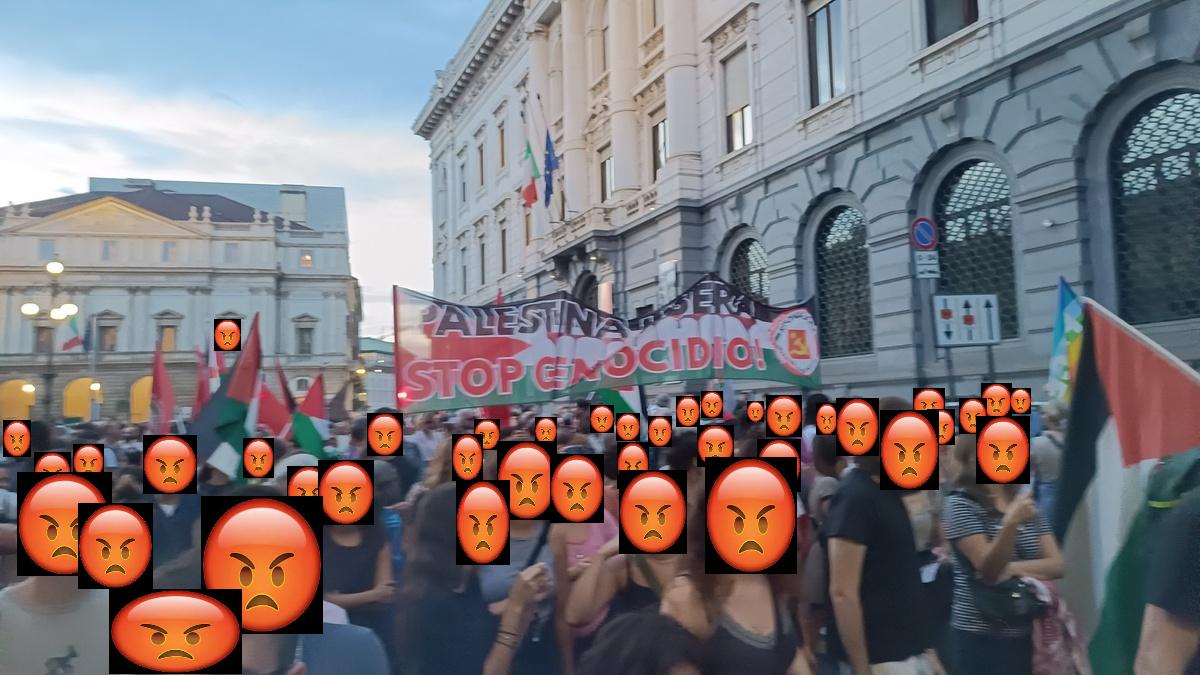
Result example:
#!/bin/bash
# Zenity GUI for processing protest images
# This script use zenity to create GUI for other script pictures.sh:
# Lets you pick a folder of images
# Lets you choose blur / emoji / skip
# Optional: choose your smiley (angry.jpg)
# Then runs your existing script to rename + resize + exif + deface pipeline on the selected images
# make sure zenity is installed: sudo apt install zenity
# 1. Choose folder
FOLDER=$(zenity --file-selection --directory --title="Select Folder with JPG Images")
if [[ -z "$FOLDER" ]]; then
zenity --error --text="No folder selected. Exiting."
exit 1
fi
cd "$FOLDER" || exit 1
# 2. Choose face protection mode
MODE=$(zenity --list --radiolist \
--title="Face Protection" \
--text="Choose how to handle faces" \
--column "Select" --column "Option" \
TRUE "Blur" FALSE "Smiley" FALSE "Skip")
if [[ -z "$MODE" ]]; then
zenity --error --text="No face protection option selected. Exiting."
exit 1
fi
# 3. If Smiley is selected, pick smiley image
if [[ "$MODE" == "Smiley" ]]; then
SMILEY=$(zenity --file-selection --title="Select Smiley Image (e.g. angry.jpg)")
if [[ ! -f "$SMILEY" ]]; then
zenity --error --text="Smiley image not selected. Exiting."
exit 1
fi
fi
# 4. Create backup
zenity --info --text="Creating backup of JPG files..."
zip -9 backup.zip *.jpg > /dev/null 2>&1
# 5. Rename phone images
for file in IMG_*.jpg; do
if [[ "$file" =~ ^IMG_([0-9]{4})([0-9]{2})([0-9]{2})_([0-9]{6})\.jpg$ ]]; then
year="${BASH_REMATCH[1]}"
month="${BASH_REMATCH[2]}"
day="${BASH_REMATCH[3]}"
time="${BASH_REMATCH[4]}"
# Convert month number to name
case "$month" in
01) monthname="jan" ;; 02) monthname="feb" ;;
03) monthname="march" ;; 04) monthname="april" ;;
05) monthname="may" ;; 06) monthname="june" ;;
07) monthname="july" ;; 08) monthname="aug" ;;
09) monthname="sept" ;; 10) monthname="oct" ;;
11) monthname="nov" ;; 12) monthname="dec" ;;
*) monthname="$month" ;;
esac
newname="${day}.${monthname}.${year}-${time}.jpg"
mv "$file" "$newname"
fi
done
# 6. Format time to HH.MMh
for file in *.jpg; do
if [[ "$file" =~ ^(.*-)([0-9]{2})([0-9]{2})([0-9]{2})\.jpg$ ]]; then
prefix="${BASH_REMATCH[1]}"
hour="${BASH_REMATCH[2]}"
minute="${BASH_REMATCH[3]}"
newbase="${prefix}${hour}.${minute}h"
newfile="${newbase}.jpg"
count=1
while [[ -e "$newfile" ]]; do
newfile="${newbase}_$count.jpg"
((count++))
done
mv "$file" "$newfile"
fi
done
# 7. Resize images to width 1200px using mogrify... change 1200x to any dimension you want
mogrify -resize 1200x *.jpg
# 8. Remove all EXIF metadata using exiftool
exiftool -all= *.jpg > /dev/null
# Delete backup files created by exiftool
echo "Cleaning up EXIF backups..."
rm -f *.jpg_original
# 9. Add incremental number prefixes (01-, 02-, ...) to files
count=1
for file in $(ls -v *.jpg); do
prefix=$(printf "%02d" $count)
newname="${prefix}-${file}"
mv "$file" "$newname"
((count++))
done
# 10. Face protection
case "$MODE" in
"Blur")
zenity --info --text="Running face blur..."
for f in *.jpg; do
deface "$f" --replacewith blur --thresh 0.3 -o "${f%.jpg}-blur.jpg"
done
;;
"Smiley")
zenity --info --text="Running smiley overlay..."
for f in *.jpg; do
[[ -f "$f" ]] || continue
[[ "$f" == *-blur.jpg || "$f" == *-angry.jpg ]] && continue
deface "$f" --replacewith img --replaceimg "$SMILEY" --thresh 0.3 -o "${f%.jpg}-angry.jpg"
done
;;
"Skip")
zenity --info --text="Skipping face protection"
;;
esac
zenity --question --text="Delete ONLY the original JPGs? Processed images (blur or smiley) will be kept."
if [[ $? -eq 0 ]]; then
for f in *.jpg; do
if [[ "$f" != *-blur.jpg && "$f" != *-angry.jpg ]]; then
rm -f "$f"
fi
done
mv *.zip backup/
zenity --info --text="Original JPGs deleted. Processed files remain."
fi
zenity --info --text="✅ Processing complete!"